
Overview
AI Credits are used when you work with AI-powered features in Dot.vu, including:
- AI Interactive Builder
- AI Customization
The number of credits used depends on what you ask the AI to do. Customizing something that already exists typically uses fewer credits, while creating an entirely new component requires more.
Understanding the difference between AI Customization and AI Interactive Builder will help you choose the right approach and get more value from your credits.
What Are Building Blocks?
Dot.vu Studio includes a growing library of more than 500 ready-made Building Blocks.
Building Blocks are components you can add directly to your project, including quizzes, games, charts, infographics, animations, buttons, and more.
Each Building Block already includes its underlying functionality and its own settings. Once added to your project, you can configure its content, design, settings, and behavior manually or use AI Customization to do much of the work for you.
AI Customization vs. AI Interactive Builder
There are two main ways to use AI when working with Building Blocks.
AI Customization
If an existing Building Block already provides the functionality you need, this is usually the best place to start.
AI Customization can configure the Building Block for you based on a simple prompt. You can use it to:
- Apply your brand, colors, and visual style.
- Rewrite or create content.
- Adjust the component’s settings.
- Translate the component.
- Create quiz questions, answers, and results.
- Adapt the component to a campaign, audience, or theme.
Because the underlying functionality already exists, AI Customization normally uses a fraction of the credits required to create something new.
For example, customizing an existing Building Block may use around 300–800 credits, while creating an entirely new quiz with AI Interactive Builder might use around 15,000 credits.
These are examples only. Actual usage depends on the Building Block and the complexity of your request.
AI Interactive Builder
Use AI Interactive Builder when you want to create something new that isn’t already available in the Building Block Library.
It gives marketers and designers the freedom to turn their ideas into custom Interactive Components without having to build them manually from scratch.
For example, you could create:
- A calculator based on your specific requirements.
- An animation or interactive element for a presentation.
- A complete marketing game for a standalone campaign.
- A product recommender that helps visitors choose the right product.
- An ROI calculator that demonstrates the value of your product or service.
These components can include custom calculations, logic, workflows, interactions, and data handling. You don’t need to define every technical detail yourself. Start by describing what you want to create, and the AI will help you shape and develop it.
Once created, your component works like any other Building Block in Dot.vu Studio. You can configure it, reuse it, or continue developing it through your conversation with the AI.
Tip: Before creating something new, explore the Building Block Library. With more than 500 ready-made options available and new ones added continuously, you may find that what you need already exists and only needs to be customized.
Your AI Credits
Every account receives 10,000 Monthly AI Credits as part of its subscription.
These credits are intended primarily for AI Customization, allowing you to regularly adapt existing Building Blocks to your brand, content, campaigns, and use cases.
Monthly AI Credits:
- Refresh at the beginning of each month.
- Don’t roll over to the following month.
- Give you ongoing access to AI Customization throughout your subscription.
If you want to use AI Interactive Builder to develop entirely new components, you can purchase Additional AI Credits.
For organizations planning to use AI Interactive Builder regularly, credit requirements can also be discussed as part of the subscription.
Additional AI Credits don’t expire and remain available until they’re used.
How AI Credit Usage Works
There is no fixed credit cost for a prompt or component. The amount used depends on what you ask the AI to do and how much AI processing is required.
Usage can vary depending on:
- Whether you’re customizing something or creating it from scratch.
- The complexity of the component.
- The amount of functionality, content, or design involved.
- How much existing information the AI needs to understand.
- How extensive the requested changes are.
Having a conversation with the AI also uses credits. However, discussing an idea or refining your requirements generally uses far fewer credits than generating or substantially changing a component.
Getting the Most from Your AI Credits
To make the most of your credits:
- Check the Building Block Library before creating something new.
- Use AI Customization when an existing Building Block already provides the functionality you need.
- Give the AI clear information about your brand, audience, content, and desired outcome.
- Discuss and refine more ambitious ideas before asking the AI to build them.
- Improve an existing result instead of repeatedly starting again.
- Save useful AI-created components as Building Blocks so your team can reuse them.
The goal isn’t simply to use fewer credits. It’s to choose the best way of working for what you want to achieve.
View Your AI Credit Usage
You have full visibility into how your AI Credits are being used.
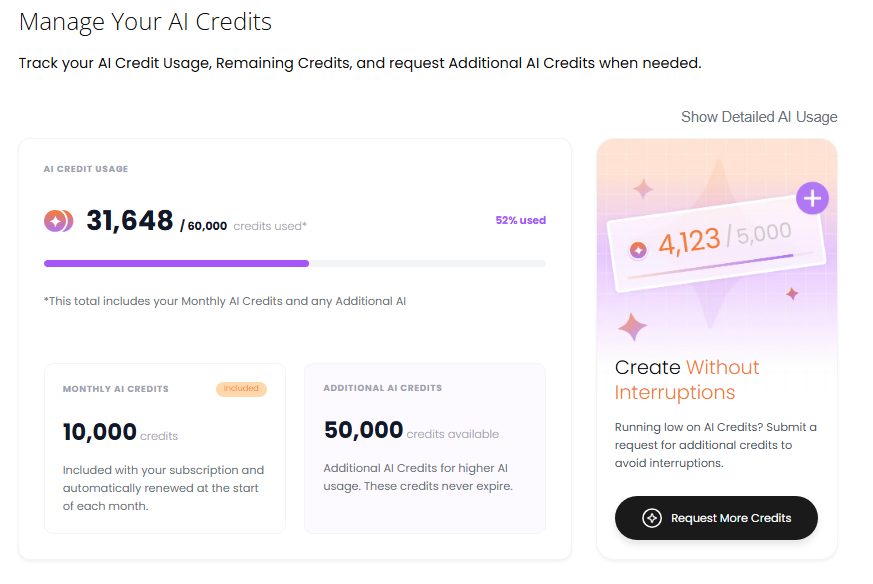
In your Dot.vu dashboard, go to:
Subscription → AI Usage
Here, you can see:
- Your available AI Credits.
- Your total number of AI runs.
- How many credits have been used.
- Usage from AI Interactive Builder and AI Customization.
- Which users have used credits.
- Which components the credits were used on.
- How many credits each component used.
- When each component was last updated with AI.
You can filter by date, user, and AI feature to understand how your account has been using AI over time.
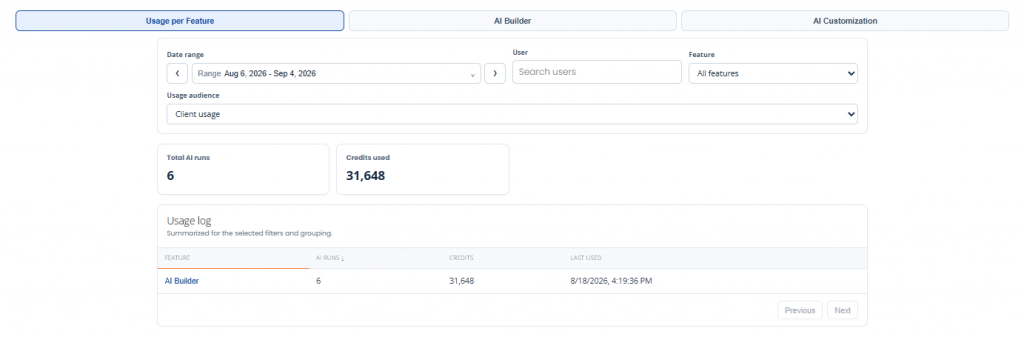
For more detail, open an individual component in the usage log. Here, you can review its description, AI conversation, credits used during the conversation, and the projects where the component is being used.
We’ll also send email reminders when your AI Credit Usage reaches key thresholds to help you keep track of your remaining credits.
Need More AI Credits?
If you want to develop new components or need more credits, go to:
Subscription → AI Usage → Request More Credits
Once your request is submitted, our team will contact you to discuss your requirements and the available options.
Additional AI Credits don’t expire and remain available until they’re used.
Frequently Asked Questions
Additional AI Credits are available for more extensive AI usage, particularly when developing new components with AI Interactive Builder. They don’t expire and remain available until they’re used.
For example, customizing an existing Building Block may use around 300–800 credits, while creating an entirely new quiz might use around 15,000 credits. Actual usage will vary.
Use AI Interactive Builder when you want to create something new that isn’t already available in the Building Block Library.
You can review the request and its credit usage under Subscription → AI Usage.
You can view usage by AI feature, user, and component, or open an individual component for more detailed information.